

Table of Contents
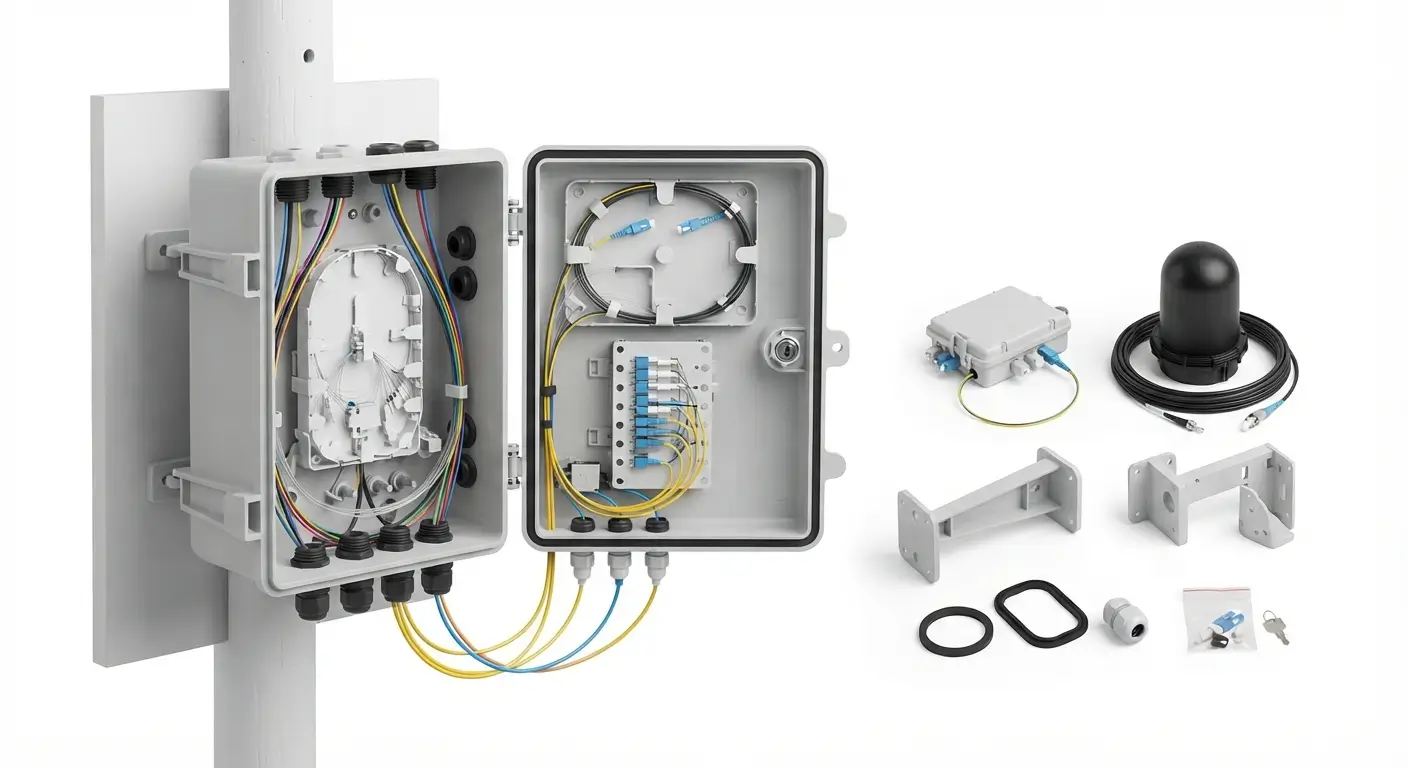
A fiber distribution box looks like a simple plastic or metal case. Yet it is the point where cables, splices, splitters, and customer drops all meet, and a poor choice there shows up for years: water ingress, crowded fibers, awkward installs, and expensive replacements.
Most buying mistakes come from judging the box by price or photo alone. This checklist walks through ten factors that actually decide whether a box will perform. Use it before you request a quote or place an order.
1. Application and Location
Start with where the box will live, because that sets nearly every other requirement.
- Indoor: apartment risers, basements, equipment rooms, and wall outlets
- Outdoor: poles, walls, cabinets, and handholes
- Underground or flood-prone: manholes and buried chambers
An indoor box used outdoors will fail early, and an outdoor-grade box in a clean riser is simply an unnecessary expense. If you are new to how these boxes fit into the network, read our guide to the FDB/NAP box in FTTH.
2. Port Capacity
Capacity is the number of subscriber ports (or adapters) the box offers. Common sizes include 4, 8, 12, 16, 24, and 48.
Choose based on homes served per box and expected take-up. Overfilling a box crowds the fiber, while an oversized box wastes money and mounting space. A good rule is to leave a small margin of spare ports for growth, so a future customer does not force you to replace the box.
3. Splice Capacity
Splice capacity is separate from port count. It tells you how many fusion splices the internal trays can hold, such as 12, 24, or 48 cores.
Count the Fiber Distribution entering the box, add the pigtails for every port, and check the total against the tray rating. Running a tray at its limit makes routing difficult. For layout best practices, see our guide to splice trays and cable storage.
4. Splitter Support
Decide whether the box must house a splitter and which format.
- Splice-only boxes rely on splitting elsewhere in the network
- Blockless splitters tuck into the splice tray for a compact build
- Cassette or plug-in splitters mount in a dedicated slot for easy swapping
Confirm the maximum ratio the box supports, such as 1:8 or 1:16, and make sure the space exists for it. If you are unsure which format fits, our comparison of blockless vs cassette vs plug-in splitters explains the trade-offs.
5. Adapter Type and Polish
Check the adapter style (SC, LC, or FC) and the polish (UPC or APC). Most FTTH and PON networks use SC/APC, and mixing APC with UPC causes high loss and can damage connector end-faces. Make sure the adapters in the box match your splitters, pigtails, and drop cables. Our guide to SC/UPC vs SC/APC covers the details.
6. Protection Rating (IP)
For anything outdoors, the IP rating matters more than almost any other spec.
- IP65: dust-tight and protected against water jets, fine for most pole and wall installs
- IP67: can survive temporary immersion, better for underground or flood-prone sites
- No rating or IP54: acceptable only indoors
Ask whether the rating applies to the whole assembly with cables installed, not only the empty shell. Gasket quality and cable-entry sealing decide whether the claim holds up in the field.
7. Material and Build Quality
Material determines durability, weight, and cost.
- ABS: economical and common for indoor and sheltered use
- PC+ABS or UV-stabilized plastics: better against sun, heat, and impact outdoors
- Metal (steel or stainless): strong and vandal-resistant, often used for cabinets and heavy-duty sites
- Flame-retardant grades: required in some buildings and markets
Look beyond the material name. Check wall thickness, hinge strength, lock quality, and whether the plastic yellows or becomes brittle under UV exposure.
8. Cable Entry and Cable Diameter
A box is only as good as its cable entries. Confirm:
- Number of inlets and outlets, for example 2 inlets and 24 drop outlets
- Supported cable diameter, such as Φ7 to Φ10 mm for feeders and smaller sizes for drops
- Sealing method: grommets, glands, or heat-shrink entries
- Strain relief for the cable strength members
Mismatched cable sizes leave gaps that let water and insects in, undoing the IP rating. Make sure the entries suit your cable types before ordering.
9. Mounting Method
How will the box be installed? Match the design to your site.
- Wall mount: the most common choice for buildings and cabinets
- Pole mount: requires straps or brackets, often supplied with the box
- Underground or handhole: needs a sealed, buried-rated enclosure
- Rack or cabinet mount: for equipment rooms
Check that mounting hardware is included, and confirm the box size fits your available space, including room to open the cover and work on the splices.
10. Fiber Management and Serviceability
A good box is one you can work in comfortably for years. Look for:
- Bend-radius guides that protect fiber from tight turns
- Hinged or removable splice trays for easy access
- Slack storage for service loops
- Clear port numbering and label areas
- A tool-friendly layout where hands can reach without disturbing neighboring fibers
Serviceability matters because most boxes are opened many times in their life, for new customers, repairs, and upgrades.
Bonus Checks Before You Order
- Supplier quality control: ask for test reports and certifications such as ISO 9001 and RoHS
- Samples: confirm fit and build quality before bulk purchase. See what to verify in our guide on ordering fiber optic samples
- Customization: logo printing, adapter configuration, and color options if you sell under your own brand
- Minimum order quantity and lead time
- Warranty and after-sales support
Common Buying Mistakes
- Choosing by price and skipping the IP rating
- Ignoring splice capacity until the install day
- Forgetting that adapters, splitters, and pigtails must match in polish type
- Buying a box too small for future growth
- Overlooking cable diameter and entry design
- Not ordering a sample first
What size fiber distribution box do I need?
Count the subscribers it will serve and add spare ports for growth. Common choices are 8, 16, and 24 ports.
What IP rating is best for outdoor use?
IP65 suits most pole and wall installs, while IP67 is better for underground or flood-prone locations.
Do I need a splitter inside the box?
Only if your network design splits at that point. Many FTTH designs place a 1:8 or 1:16 splitter in the distribution box.
Is a metal or plastic box better?
Plastic is lighter and corrosion-free, while metal gives more strength and vandal resistance. Choose based on location and risk.
Can I mix SC/APC and SC/UPC in one box?
No. Keep polish types consistent across all components.
Conclusion
The right fiber distribution box comes down to ten questions: where it goes, how many ports and splices it needs, what splitter and adapters it must hold, how well it is sealed, what it is made of, how cables enter, how it mounts, and how easy it is to service. Answer these before you buy, and the box will quietly do its job for years.